





Dynamics 365 Customer Service Pricing and Licensing Guide (2026)
When deciding whether or not to implement Microsoft Dynamics 365 Customer Service, the two most common questions that are asked are about the price, and how licensing works. There are several factors that will affect the price you pay including what edition you choose, the length of your contract, any extra features you add and the setup fee.
As we specialize in setting up these systems for our customers we have created this guide to help explain everything in a simple way. All prices shown below are taken directly from the Microsoft Customer Service pricing page. These prices were accurate as of November 2026. Microsoft can sometimes change their prices so whilst this is a great starting point to help you plan, please ensure you check your final quote when purchasing.
1. What Dynamics 365 Customer Service Actually Does
Cutting through the marketing speak, Dynamics 365 Customer Service is a cloud based CRM focussed on making your support operation run smoothly. Rather than having separate ticketing systems, telephony systems and spreadsheets to track SLA’s, Dynamics 365 Customer Service allows you to manage all your cases, customer interactions, service agreements and reports in one central place.
Because it is a Microsoft product, it integrates easily with Microsoft 365, Teams, Power BI and Dynamics 365. You’ll be able to have a unified experience across all your agents, as they will have one screen where they can manage the customers’ emails, chat, calls and messages. With AI features such as Copilot and new service agents switched on, the system can help out with the repetitive tasks so you can put your focus on the issues that really require human intervention.
A few of the things it handles out of the box
- Cases & SLAs: every case will be logged and moved from ‘taken’ through to ‘resolved’. The system will also monitor if you are adhering to your SLAs.
- Smart routing: Cases, chats and calls are delivered to the correct agent based on skills, priority and workload.
- All channels in one place: Everything is brought together in one place — phone, email, chatting and social messaging. This ensures your customers are never left repeating themselves.
- Knowledge base: Case answers are pulled from the knowledge base, and agents can call an expert from within Teams.
- AI powered service agents: These are available at the higher levels and will read and understand conversations and case information. They will complete basic actions automatically and will highlight any suggestions. All within your set controls.
- Copilot: Helps draft responses, summarizes long case history and will find the correct knowledge article when asked to by an agent.
- Booking & scheduling: If you need to book appointments or send out people then cases will link directly to your booking and resource scheduling.
2. Dynamics 365 Customer Service Licensing Explained Simply
Dynamics 365 Customer Service is a per user, subscription-based product. This means you must purchase a license per user (you cannot share licenses). When an agent leaves, you can give their license to the new person.
You can also choose how long you want to commit to the product. This will impact your flexibility and how much you pay:
- Monthly – Most flexible option. You can increase/decrease your seat numbers every month. This can be useful if you have seasonal support team members. However, you will pay a marginally higher price per seat.
- Annual – Most popular for small and medium teams. You get a locked price for the year and can easily increase your team members. At renewal you can reduce your team.
- Multi-Year – Usually 3 years. You get less flexibility however you have a stable price and can forecast your budget.
You will also have to choose what edition you want to use. There are 3 options: Professional, Enterprise and Premium. These range from simple case management to a complete Omni channel solution with an inbuilt contact centre and AI. Depending on how involved your service needs are and how many channels you want to use, you can choose the appropriate option.
3. Dynamics 365 Customer Service Pricing: Plans Compared
All 3 versions are per user, per month. Below are the prices Microsoft are currently quoting.
Professional
Simple / low volume support teams
- Case management
- Knowledge base
- Customer self-service portal
- Basic reporting
Enterprise
Busy teams looking for Omni channel, routing and analytics
- Everything in Professional
- Unified routing & Teams integration
- Copilot & embedded intelligence
- Multi-session, analytics & KPI reporting
- Power Apps & Power Automate
- Workforce engagement features
Premium
Teams looking for an inbuilt contact centre and AI
- Everything in Enterprise
- Full Dynamics 365 Contact Centre
- Self-service chat bots & IVR
- Live chat via messaging/social
- Full voice channels + Copilot Credits
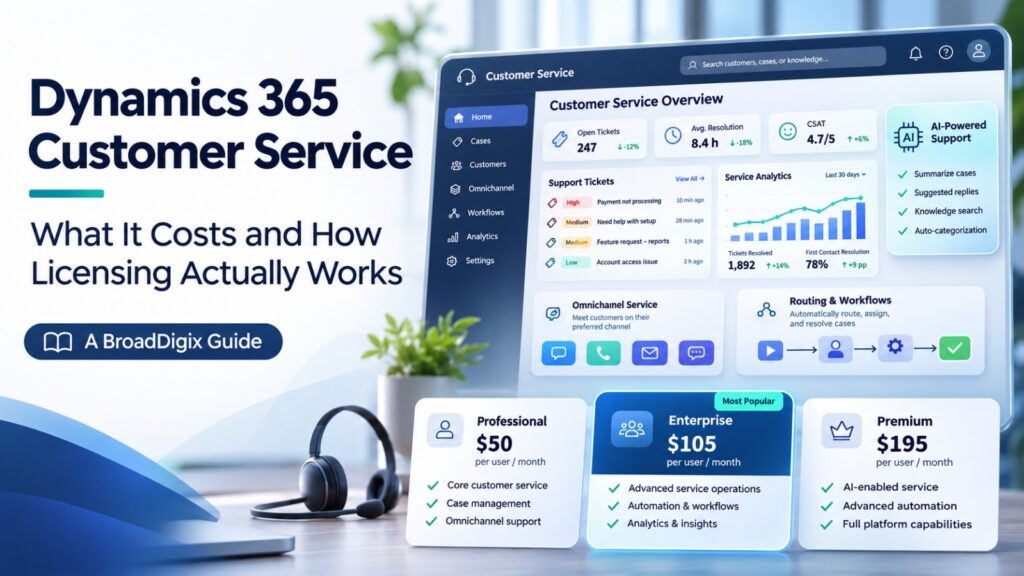
Professional ($50) – The most basic version of the product. It gives you case management, knowledge base, customer self-service portal and basic reporting. This is ideal for simple support tasks and if you do not require high levels of automation or multiple channels.
Enterprise ($105) – This is the next step most growing teams will take. It has everything from Professional but also includes unified routing, integration with Microsoft Teams, Copilot integration, embedded intelligence, multi-session, analytics, KPI reporting, portals, custom apps via Power Apps and workflow automation via Power Automate. It also has workforce engagement features including forecasting and shift scheduling.
Premium ($195) – The most advanced version of the product. This includes everything from Enterprise but also includes the full Dynamics 365 Contact Centre. This means you can use self-service chat bots, IVR, live chat via messaging/social platforms and full voice channels including inbound, call summary and outbound. This is a Copilot-first product with a base level of Copilot Credits included for AI service agents.
4. Dynamics 365 Customer Service Add-ons, Credits and Light Licenses
Dynamics 365 Contact Centre
If you are using Enterprise but want contact centre features without upgrading to Premium, you can buy the Contact Centre as a standalone license at $110 per user per month. Enterprise plus the add-on costs around the same as Premium — but Premium is a single license, so it’s the cleaner option for the full product.
Copilot Credits
Your AI service agents (Case Management Agent, Customer Intent Agent, Quality Evaluation Agent) use Copilot Credits. Premium includes a base level per user per month. Professional and Enterprise require you to purchase them separately — pay as you go, or up front within the Copilot Credit commitment to save up to 20%. Running agents also requires an Azure subscription.
Team Member license
Not everyone on your team will require a full license. If they just want to view cases and reports, you can use the Team Member license. This is an inexpensive license and should only be used for minimal reading. Ensure they truly fit within the license restrictions.
5. Dynamics 365 Customer Service Implementation Costs
Typical one-off cost to implement, depending on complexity
Licenses will be an ongoing cost however you will also have a one-off cost for implementing the product. This is often an underestimated cost. Implementation includes designing the solution to suit your business, configuring the product, connecting any integrations, migrating your data, training your team and providing support.
Most implementations will be between $20,000-$150,000+. This depends heavily on how complex you want the solution. A simple solution with minimal customization can often be implemented on a quick-turnaround basis. Whereas a complex enterprise solution will be on the higher end of the spectrum.
Things that will cause your price to increase
- Complex service processes – If you have multiple teams, escalation processes, multiple SLA’s, entitlements and global support, this will mean more configuration and testing.
- Large volumes of data to migrate – Migrating your historical cases, customers, contracts and knowledge articles can be a simple import or a true transformation project.
- Customization and automation – Custom workflows, routing, dashboards and extensions will all increase the amount of development and testing.
- Integrations – Integrating with your ERP, telephony, marketing tools and other third party solutions will require API’s and middleware.
- Training – This can be an overlooked cost. If you do not provide enough support to enable your team, they will not utilize the product properly.
The cheapest implementation quotes are not always the best option. Often these are based on generic templates or teams who are not too familiar with the governance and compliance side of things. This will often result in missing routing, inconsistent reporting and rework. Often this will cost more than doing things properly. A well planned implementation will give you cleaner reporting, faster resolution times and adoption.
6. Dynamics 365 Customer Service Total Cost of Ownership
The price of the license will not give you an accurate picture of what the true cost of the product will be. Total cost of ownership will give you an accurate indication. This includes your one-off cost to implement and the subscription cost.
Cloud has changed the way we look at this. Previously with on premise solutions we would have large license costs, purchase servers, configure databases, invest in security, IT staff to keep things running and painful upgrade projects every few years. These costs were unpredictable and would only increase as the hardware aged.
With Dynamics 365, most of this is covered by your license. Your license covers your Azure hosting, infrastructure, security updates, maintenance and new features. There are no servers to worry about and you will receive automatic updates. This removes any disruption from upgrades and you will have new features including AI.
This makes things much easier to manage as you are paying a predictable monthly cost for your infrastructure, maintenance and upgrades. This will also help most organizations have better control over their budget, less IT overhead and less risk in the long run.
7. Where to Buy Dynamics 365 Customer Service
You cannot purchase Dynamics 365 Customer Service directly from Microsoft. Microsoft have certified partners who can sell, implement and support the product. Using a partner will give you guidance on what version to go for, how long to commit for and how to plan your implementation.
Choosing the correct partner will be one of the biggest factors in your success. A competent partner will ensure your platform is set up to match your case structure, SLA, routing and reporting. They will also handle your training, integrations, AI and optimize your solution as your needs change.
We are a Technology Solutions & Managed Services company with lots of hands-on experience with the Microsoft stack. We can help you choose the correct licensing for your organization, implement your solution efficiently, integrate your Customer Service solution with your ERP and telephony systems and turn on your AI capabilities. Our focus is on creating scalable service environments with clear visibility.
If you are looking at Dynamics 365 Customer Service or have a messy implementation to fix, we would be happy to talk through your options. Get in touch with the BroadDigix team.
Tips to Keep Your Dynamics 365 Licensing Costs Low
Thinking ahead will save you money and keep you compliant:
- Choose the right version – Think about your volume, channels, routing and AI requirements. Choosing the correct version will avoid any hassle of upgrading.
- Use base and attach – If your team are using multiple applications, Microsoft have a base and attach option. Choose your highest priced application as your base and attach qualifying applications at a discount. This can really bring your costs down.
- Use Team Member licenses for light users – If your users just want to view cases or make small changes, they do not need a full license. The Team Member license is much cheaper. Ensure they fit within the license restrictions.
- Audit your licenses – Occasionally check who is using what. Removing any unused licenses and planning ahead for your team changes will keep your costs low.
- Stay up to date with Microsoft – Prices, packages and promotions change periodically. A good partner will keep you up to date on any cost saving opportunities.
- Use licensing experts – The rules can become complicated quickly. Using people who know the rules well will ensure you purchase the correct products.
8. Dynamics 365 Customer Service Pricing and Licensing FAQs
How is Dynamics 365 Customer Service licensed?
It is licensed per named user. Each person who needs access will need their own license. You will also have to choose which version (Professional, Enterprise or Premium) and how long you want to commit (Monthly, Annual or Multi-Year).
How much does it cost?
It is priced per user per month (paid yearly). Professional is $50, Enterprise is $105 and Premium is $195. The price increases depend on how much functionality and AI is included.
What is the difference between Professional and Enterprise?
Professional is the most basic version. It provides you with the basics — case management, knowledge base and basic service tools. Enterprise has much more functionality including unified routing, embedded analytics, workflow automation, Microsoft Teams integration, Copilot and much more customization. If you require multiple channels or any automation, Enterprise is usually the way to go.
Do you have a minimum number of licenses?
No. You can start with just 1 user and increase as needed.
Can you mix licenses?
No. All full licenses must be on the same version. However you can add Team Member licenses.
Can you trial the product?
Yes. Microsoft offer a free trial.
Do you have a non-profit rate?
Yes. Microsoft offer discounted rates for non-profits who fit their criteria.
How much will it cost me to implement?
Typically, it will cost between $20,000-$150,000+. The price will depend on how complex you want your solution. Simple solutions will be on the lower end and complex enterprise solutions with lots of integration and automation will be on the higher end.
What are Copilot Credits?
Your AI service agents use Copilot Credits. Premium includes a base level of Copilot Credits. Professional and Enterprise require you to purchase them separately. This can be done on a pay as you go basis or purchased within the Copilot Credit commitment. To run your agents, you will also require an Azure subscription.
Getting Started with BroadDigix
Having an understanding of the Microsoft Dynamics 365 Customer Service pricing and licensing will give you a solid foundation. We are a certified Microsoft partner who can advise of the right edition, plan and implement the licensing of your solution. Our team will ensure that your solution is correctly configured and data migrated; plus we can integrate with ERP systems and telephony. We will also enable the use of Copilot and AI service agents to provide a seamless and scalable solution for your support operation. Whatever stage you’re at, whether it be edition comparison, planning within your budget or remediation of a messy deployment, BroadDigix have clear guidance and practical knowledge of the Microsoft stack!
Talk to a BroadDigix Dynamics 365 Expert →Prices are current as of November 2026. Prices can be found on the official Microsoft Dynamics 365 Customer Service pricing page . Prices are for information purposes only and may vary depending on region, currency and terms. Please confirm pricing with Microsoft or your Partner at the time of purchase.